General Explanation
Type: Trojan
Degree of destruction: average
Prevalence: average
What is a Trojan?
Trojans are malware that revealed themselves in the format of an applicable and useful tool. Accordingly, the user downloads and installs them and infects the system without noticing that it is malware. Trojans, usually after installation, act as a backdoor so the hacker can remotely access the victim’s system. For instance, the malware we will analyze here seems to do an applicable and useful job, but it will install an unwanted application on the system.
What is Ahmyth malware?
It is a spy RAT (Remote Access Trojan), which with its use of it can remotely access any android device. Also, it allows the device admin to steal users’ data such as messages and contacts, listen to the victim’s conversations, record voice, and video, control the camera, call establishment, etc.
Technical Explanation
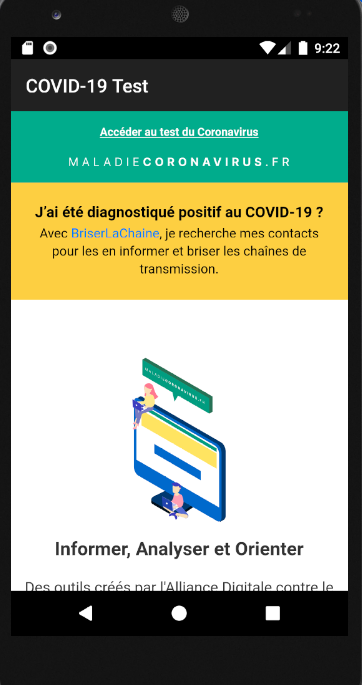
The name of this application is “COVID-19 test” and apparently, it shows a web page about coronavirus; but actually, it is a spyware that performs a malicious operation in the background to connect with its server.
- First, by using a method named acquired() will activate the “WakeLock” (keeps the screen on) and “WifiLock” (keeps the WiFi on) services for its application and then by using the isheld() method will check the access of both services.
- It checks whether it allows showing notifications. If it has not the permission to access (which normally most applications do not have the permission) it will enable the Show Notification option for its application using ” android.settings.ACTION_NOTIFICATION_LISTENER_SETTINGS”. Then by using ClipboardManager and OnPrimaryClipChangedListener methods it will check the changes in the clipboard. In case of any change, it will access the new content and sends it to its infected server (hxxp[:]//tweensangoma.servebbs[.]com:22222). Since maybe the confidential and critical information such as passwords, messages, photos, etc. will be saved in the phone clipboard, the malware can easily, monitors and records them.
- It will receive instruction from its infected server, in the format of a JSON file and accordingly will proceed to its malicious operation according to the existing value in the V2 variable it will perform one of the following operations:
- If V2=”0xFI”: the malware can access existing information in the user’s phone such as all images, files, cookies, etc.
- If V2=”0xSM”: it accesses all send/receive messages along with contents (the date of send or receive the message, message text, and message type), additionally, it will send SMS to any desired number using sendTextMessage.
- If V2=”0xCL”: providing call logs (the phone numbers, call types, income/outcome calls, the date of the call).
- If V2=”0xCO”: Provide a list of phone contacts (name and phone number)
- If V2=”0xCO”: recording voice from microphone and restoring it in the format of an audio file named Sound and mp3 type in the path of the directory named Sound.mp3
- If V2=”0xLO”: attaining the location of the user (GPS)
- If V2=”0xWI”: attaining full information of network connections (e.g. MacAddress)
- If V2=”0xPM”: checking and attaining the list of all received information by the application
- If V2=”0xIN”: attaining the full list of information of all installed applications (name, packagename, versionname, versioncode, etc. ) on the user’s phone using the getInstalledPackages method.
- If V2=”0xGP”: checking and attaining permissions that the malware itself can use it.
Eventually, after performing the malicious operation and collecting the desired information about the victim, this malware will connect to its server and sends the collected information to it. This application uses a library named Socket.Io to connect with its infected server.
Socket.Io library includes different APIs that use as a link to connect the user’s browser to the server.
How to deal with it and disinfect the system
To make sure that the system is safe, install Padvish Antivirus and keep its database file and scan it.
Methods of preventing phone infection
- Avoid downloading and installing any application from unauthorized resources/markets.
- Note the requested permissions, when installing the mobile application.
- Continuously back up your saved data and files.
- Do not use an unofficial version of applications. Applications such as Telegram, and Instagram have many unofficial versions and most of them release through Telegram channels.